Saturday, October 19, 2013

Request-a-Model 2

Hi Everyone,

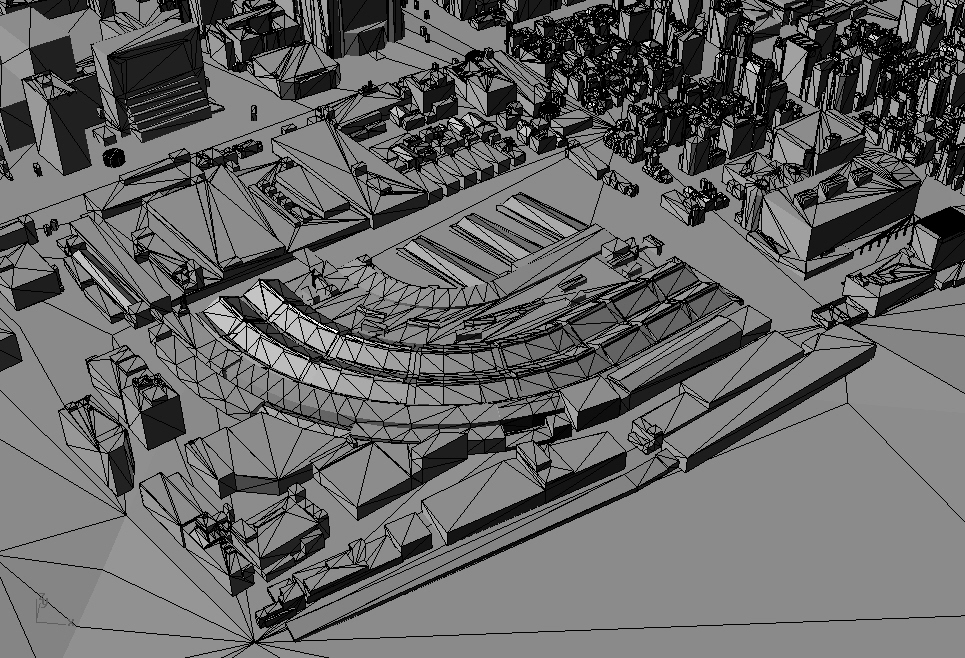
Sorry that it's taken so long to get a rig together that will work. I'm now using 3D Ripper DX with Google 5.2.1.188 and 3d max design 2011 to pull models out of google earth. I am currently using a GTX 550 card, though I've also seen it work with some integrated mobile video cards as well. 

For those that can not grab their own site, I will try to respond to requests here, time permitting. Requirements are same as previously:

- the larger the request, the more "rough" the mesh will be
- the best size for a grab is 1-2 city blocks
- and for special requests (like textures), please include your email so I can contact you. 


-Shimmy


Wednesday, January 16, 2013

Request-a-Model

To request an extracted Google Earth model (via GLXtractor method), simply post a reply below. In it, please let me know the following: Google longitude/latitude, height, and intent for the model. <-- Interested to see what cool stuff people come up with. I will then post a small 5x5 block of the site for you to download here.

There's got to be a better way around this. I'm often too busy to check up here. To expedite the process, I recommend sending me a Google Earth kml file of the site, at the correct zoom. And keep your requests tight (max 2km high). Or at least send me a screenshot I'll try to respond within a reasonable time limit. Thanks! 1-16-13

Sorry guys, my Vostro 1500 laptop is down. Seems only that type of laptop works with this process. So until I can fix it, this service will have concluded. Sorry to those that recently requested help... you were a bit too late!

Chicago Loop KK
Times Square ML
Westlake LA KK
NYC JP
Miami Beach NG
Peachtree Atlanta CW


- Evan: Dog Park, Washington Square Park, NYC

- Nick: Palazzo, Las Vegas (big file, you'll need to stitch)

- Mezzzo: Brooklyn Navy Yard

- Asia Rivera: Paris

-Ciro: Florence

- Irma: Le Gru Shopville

- Jill: Times Square

- Megan: Pretoria Union, South Africa; site

- Sam: Flat Iron, NYC

- ANNA: Detroit Waterfront

- Clemens: Berlin

- flok: Avenida Paulista

- Federico Nigro: Milan

- UB: Apple Headquarters, CA

- Stellenbosch South Africa

- Bogdanov: TriBeCa, NYC

- del Carmen: San Diego part A, part B

- Alex Phi: Crystal Palace, Oakland

- sarah L.: East Village, NYC

- augsav: Cincinnati, OH

- Sergio del Castillo: Madrid

- Steven K: Vienna


- Jason Potter: St. Stephen, Vienna

- UB: Cupertino, but not complete

- Mateusz Nosek: Chicago (east)

- Antoine: Port of Athens

- Troels: Copenhagen

- anders: Central Park (big!)


- maps deenon: Oslo

- Joe Moe: Houston

- Greg: Polynesian Resort, Walt Disney

- Barbatana: Berlin (stitched)

- Johnathan: Minneapolis, detail

- Jenn: : Shore Club Hotel

- Peggy Dermody: Thompson Center, Chicago

- YvonneVictoria: Oslo center

- Darrick Borowski: Lower East Side

- Christos Cloudel: Athens, a bit more to the North

- alex Klos: Munich

- pozsgayb: Budapest

- German Cintas: Asuza LA (east of Sci Arc)

- Chris: Broadbeach

- bobtilton: Chicago (obj format)

- downtown Santa Monica

- CNArchitecture: Melbourne (west of Exhibition Hall)

- shmamson: Philadelphia Museum of Art, as obj file

- Igor: Venice, CA

- Estadio Santiago Bernabéu, Madrid

- ddutchie: Berlin

- Ale k: Dublin, Dublin B

- Sarah: North Abu Dhabi

- Maria: Nikolaiplatz, Munich

- Hepto: Minato, Tokyo

- Demetrio: Old Lisbon Center

- Sirla: Reykjavik, Iceland

- Sitou: Texas Medical Center

- Governor's Island

- Berlin (SE)

- Vienna

- Munich 

- Kolobreg, Poland

- Texas Medical Center

And I'm back after a week hiatus:

- Otto Wagner Pavilion

- Place Vendome

- Ramp with building heights


- Raffles Place, Singapore

- Venice

- Coal Harbor

- Chartreuse range

- Zakozaki junction

- La Carlota Airport (with overlaps)

- Seattle Downtown


- Ponte Santa Trinita, Florence

- Raleigh Lake, NC

- Flinders Street, Melbourne

- Chinese Embassy

- Utrecht Transtation, unstitched

- London, stitched

- Hansaviertiel

- Warsaw

- Ginowan raw captures

- DC Rotunda

- Metrodome, Minneapolis

- London

- Berlin Haupbahnhof
- Hamburg Haupbahnhof, center

- Milan South, detail, and Milan's traditional center

- Providence, RI

- Guggenheim, NYC


- beautiful Pompidou, Paris

- Cardiff, UK

- Milan train station

- Itami Airport, raw captures; stitched, thanks to David

- 3rd Arrondissement, Paris

- Portuense, Rome, triple stitched so you may have some overlaps

- Rotterdam, zoomed out.

- San Francisco. You were almost there:

 first delete the north and compass boxes, zoom extents

then delete the text and data boxes, zoom extents

finally, unweld your model

- Milan

- Brussels

- Sanei-cho

- Honkomagome

- Macau

- Parthenon

- Copahagen

- Rinjhaven small large

- Amsterdam

- Downtown LA

- Pasadena, LA

- Beverly Hills, LA

- Chicago

- Windsor Ontario

- Magic Kingdom

- Centro, Rio de Janeiro, Brazil


- Muhouse, France -sorry for the delay, I'm definitely getting lazy


- Tokyo fish market


- Tokyo


- London:


- Berlin:


- Houston MMPark:


- Greater London:

Only a portion seems modelled here, good luck!


Tuesday, September 11, 2012

City Collection

From time to time I wander through Google Earth, mesmerized by the intricacies of these 3d models (though they are shallow approximations). As a record I've started to gather a few parcels here and there of our cities, for myself and others who want to play around:


Berlin

Barcelona, Spain

Colosseum, Rome

Central Park, NYC  Link updated 131019

rhino5 capture with glxtractor


Paris

Prague

Shanghai Bund, China

Vatican See, Rome

Venice, Italy


Tuesday, November 22, 2011

Smart Select Pt.2: Set Current Layer

I've been using this script since early this year. It started from our frustration at: "Which layer does this object belong to?" and "Why must I always look at the properties tab?". I wrote the script to help find and quickly do some layer management/ file cleanup:

DefaultLayer.rvb: alias "d" - used for steps 5 and 6

So pick your object, run the script, and choose the following:
1. Set current layer to the object's layer*
2. Select all objects on that layer
3. Hide all objects on that layer
4. Isolate all objects on that layer
5. Turn that layer off
6. Lock that layer
7. Do nothing, other than peek at which layer that object belonged to*.

*change the "Current Layer Background" to a bright color to really see that layer pop. Find it at Options --> RhinoOptions > Appearance > Colors > LayerDialogBox.

Rhino has most of these commands (SetLayertoObject, OneLayerOn, OneLayerOff, SelLayer), but typing/ clicking through them is way too much work.

photos coming soon...

Smart Select Pt.1: Select Similar Object

I'm working on a smarter selection tool for rhino, so I'm starting with the basics.

This script selects:
similar closed polysurfaces by volume and at least one other dimension...
similar open surfaces/ polysurfaces by surface area...
similar open or closed curves by length, control points...

So click any of those objects, and watch as the script picks up similar objects in your file!

SelSimilarObjects.rvb (remember to convert the .txt into .rvb)

Wednesday, October 12, 2011

Spatial Deform: Grasshopper Introduction

Rhino's CageEdit command's closest equivalent in grasshopper is Spatial Deform. The combination of an already powerful command with grasshopper's interactive nature makes this a very complicated and memory intensive tool to figure out and use. Other than this Q&A and this demo, I really can't find a good example of using Spatial Deform, so here goes a basic introduction:


To use Spatial Deform, you'll need to attach the following:
'G' - the rhino geometry to deform
'S' - a series of points that will define the cage
'F' - the forces applied to each of the points in 'S'
'f' - a falloff equation

Now this script takes advantage of Kangaroo's removeDuplicatePts. If you don't already have it, get it at their website.